
TikTok Downloader: Download Videos Without Watermark, HD, Free
TikTok does not give you a way to save a video without its logo and username stamped across it. TikTok downloader on TocWave does. You need to paste a link and get a clean MP4 (or MP3, if you just want the audio), free, in HD, with nothing to install.
What is TikTok Downloader?
TocWave is a browser-based TikTok video downloader. Paste a public TikTok link and it fetches the original video. The file TikTok stores before its app adds the watermark and username overlay, and hands it back to you as a clean MP4 or MP3. There is nothing to install and no account needed.
It is built for creators who want a TikTok video off the platform and onto their own device or anyone who wants to save a video to watch offline. It works only with videos that are already public on TikTok. You cannot access the private accounts and remove videos.
Beyond video, TocWave is a full TikTok toolkit: separate tools handle audio extraction, photos and slideshows, Stories, thumbnails, profile data, captions, and hashtags. Each one is built for its own specific task. You will find the full set below.
If you are looking to install TikTok rather than download individual videos, our TikTok app installation guide explains how to get the app set up on Android.
How to download a TikTok video?
Download video TikTok process takes four simple and easy steps:
1. Copy the TikTok video link
Open the video in the TikTok app or on tiktok.com, tap Share, then Copy Link.

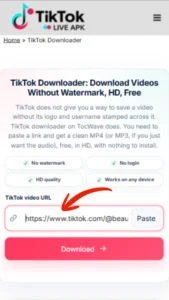
2. Paste the link into the downloader
Return here and paste the video URL into the TikTok downloader box at the top of this page.
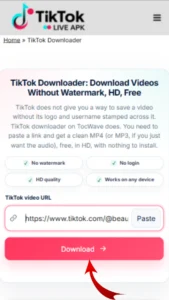
3. Tap Download
Press Download and wait a few seconds while the video is processed.
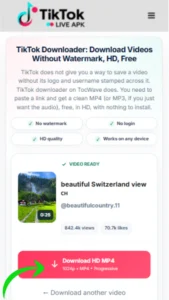
4. Choose your format and save
Choose MP4 (no watermark) or MP3, then save it. It lands in your browser’s normal downloads folder, ready to use offline.
Why use TocWave?
Following are the unique features making this TikTok downloader worth using:
No Watermark, No Logo
The TikTok username and logo overlay is gone, what downloads is the clean source video, not a screen-recorded copy with the logo cropped out.
Free, No Limits
No download cap, no subscription, no paywall on the core tool.
No App, No Login Needed
Runs entirely in your browser. Nothing to download, nothing eating up storage, no account, no third-party app permissions to grant.
MP4 & MP3, Your Choice
Download the full TikTok to MP4 video, or just pull the audio as MP3, with the same link, two output options.
Fast, Uninterrupted Downloads
No queue, no waiting through ad timers before the file is ready.
Simple, Clutter-Free Interface
One box, one button, and nothing to figure out.
Formats and video quality
Videos download as standard MP4 files, and audio extracts as MP3. Resolution matches whatever the original upload supports. Most TikTok videos are 720p-1080p, and that is what you will get. TocWave delivers files as-is, without extra compression on our end, so what downloads is what was originally posted.
Works on all devices and browsers
Android and iPhone
TikTok downloader works directly in mobile Safari or Chrome. You do not need a separate app for either platform. If you’re looking for the TikTok app itself, you can also learn more about TikTok for iPhone and iPad.
Windows, Mac and Linux
Windows, Mac and Linux use the same browser-based downloader. If you prefer using TikTok on a larger screen, see our guide to TikTok for PC for desktop options.
Any modern browser
Chrome, Safari, Firefox, and Edge are all fully supported. For more information about browser compatibility and supported web technologies, you can check the MDN Browser Compatibility Data.
Explore our TikTok toolkit
Video is just the start. Every tool below is purpose-built for one specific TikTok task. Pick the one that matches what you actually need.
Photos and Stories
Grab a video’s cover image in full resolution.
Try now.
Watch Tik Tok Stories without an account & Download before it disappears in 24 hours.
View a TikTok photo post or slideshow in full size before you decide to save it.
Save every image with TikTok photo download from a post or slideshow, individually or as a set.
Audio and Data
Pull the full audio track from any TikTok video as an MP3.
Pull the spoken text or captions from a video.
TikTok sound downloader isolates the background music or song used in a video, separate from voiceover.
Download multiple videos, photos, or slideshow sets at once, packaged as a ZIP.
Profile and Discovery
Save a public profile’s photo, see followers and other details without logging in.
Pull every hashtag used on a video or trending in a niche.
Try now.
Is it safe to use?
Yes. TocWave does not ask for a login, an email, or any personal information. The only thing it needs is the link you paste. Downloads happen in your browser; nothing is installed on your device. We don’t store the videos you download, and we don’t keep a history tied to you or your device. We ensure your data security and encrypt your privacy.
Responsible use and copyright
Downloading a public TikTok video for personal, offline use is generally fine. The content itself still belongs to the person who made it. Reposting someone else’s content as your own, or using it commercially, needs their permission. TocWave does not host or store any TikTok content on its own servers; it is a tool for downloading what’s already public, not a video library. Full details are in our Terms of Use and Copyright/DMCA Policy.
Frequently Asked Questions
Closing thoughts
That is all for you to download TikTok videos. Paste a link, get your file, no account and no app required. If you need something other than the main video, the rest of the TikTok downloader toolkit is one click away.
More from TocWave
We are building our guides on how TikTok watermark removal works, why video quality can vary between downloads, and how to get the most out of each tool in the toolkit above. Check back, or explore the full toolkit for the specific TikTok task you need done right now.