
TikTok Photo Downloader: Save TikTok Photos in HD Without a Watermark
You are swiping through a TikTok photo post and land on the perfect image: an outfit idea, a travel spot, a quote, or a recipe card. You want it in your camera roll. So, you take a screenshot, and it comes out cramped, cropped and covered in buttons, captions and the like count.
Photos are delivered through TocWave for reliable downloads. The ZIP file is made in your browser.
There’s a cleaner way. A TikTok photo downloader saves the actual image file the creator uploaded, not a picture of your screen. With TocWave, you paste the post link, pick the photos you want and save them in original HD quality, with no watermark. It works in any browser, with no app and no login.
This guide shows you how to download TikTok photos step by step, what quality to expect, and how to sort out the odd hiccup along the way.
What is a TikTok photo downloader?
A TikTok photo downloader is a web tool that pulls still images out of a TikTok photo post and saves them to your device as image files. It’s built for photo posts, the swipe able posts made in TikTok’s Photo Mode, rather than regular videos.
A single photo post can hold up to 35 images, often with music playing in the background. TikTok’s app is not really designed to hand you those images one by one.
Depending on the post and your app version, the save option may be missing, may save the post as a video, or may stamp a watermark on it.
TocWave keeps it simple. As a TikTok downloader photo tool, it reads the public post, shows you every image in a grid, and lets you save exactly the ones you want:
One photo or several
Tap the images you like, and skip the rest.
Original HD quality
You get the resolution the creator uploaded.
No watermark
No TikTok logo, no username tag.
JPG files
Ready to open, edit or share on any device.
TocWave is an independent tool and is not affiliated with TikTok.
How to download TikTok photos
Here’s the full process for a TikTok photos download, from link to camera roll:
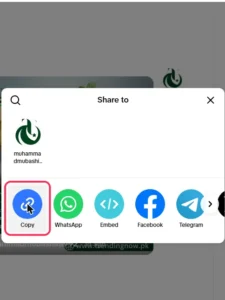
1. Copy the post link.
Open the photo post in TikTok, tap Share, then Copy link. On desktop, copy the URL from the address bar.
2. Open TocWave.
Go to the TocWave TikTok Photo Downloader in any browser.
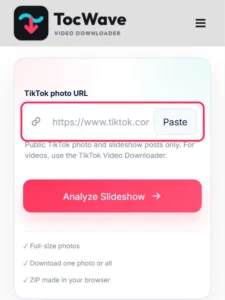
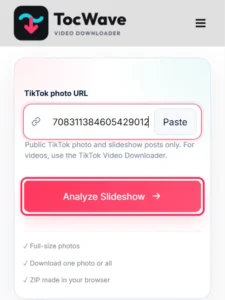
3. Paste and fetch.
Paste the link into the box and tap Analyze Slideshow.
4. Choose your images.
Every photo in the post appears as a thumbnail. Tap Download under any single image you want.
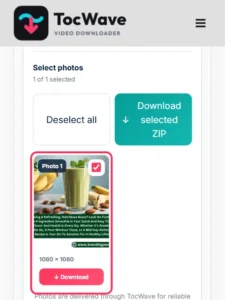
5. Save.
The JPG lands in your Downloads folder or camera roll, depending on your device.
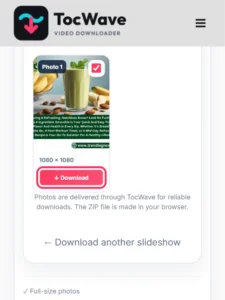
Need every slide at once? Select all the photos and save them together in one ZIP file.
TT photo download on iPhone, Android and PC
The steps above work everywhere. Where the file lands is the only thing that changes:
TikTok photo download without watermark
If you’ve ever saved a TikTok post through the app, you’ve probably seen the TikTok logo and username plastered on top. That’s the app adding its branding to the saved copy. A TikTok photo downloader without watermark skips that step.
TocWave saves the image file itself, before any branding is applied. Nothing is blurred, cropped or painted over, because nothing needs to be removed. A TikTok picture download without watermark works the same way for every image in the post.
To be clear about what “no watermark” covers:
If you’ve been searching for how to download TikTok photos without watermark, that’s genuinely all there is to it: copy, paste, save.
TikTok photo download HD: what quality will you get?
A good TikTok image download HD option should never shrink or compress your images. TocWave saves each photo at the same resolution the creator uploaded publicly.
Here’s what to expect from each file:
|
Detail |
What you get |
|---|---|
|
File type |
JPG (TikTok to JPG, with no conversion step for you) |
|
Resolution |
The full-size image TikTok serves for the post |
|
Aspect ratio |
As posted, usually 9:16, sometimes 1:1 or 4:5 |
|
Watermark |
None added |
One honest note: no tool can make a photo sharper than the original. If a creator uploaded a small or blurry picture, the download will look the same. Sites that promise to “enhance to 4K” are just enlarging the file.
TikTok image downloader vs. screenshots
Screenshots feel faster, but they cost you quality and extra editing. Here’s how a TikTok image downloader compares:
|
TikTok image downloader |
Screenshot |
TocWave TikTok Photo Downloader |
|---|---|---|
|
Image quality |
Limited to your screen |
Original upload resolution |
|
On-screen clutter |
Buttons, captions, likes |
None |
|
Cropping needed |
Almost always |
No |
|
Saving 10+ photos |
One by one, swipe by swipe |
Pick from one grid |
For a single quick reference, a screenshot is fine. For anything you’ll print, edit, post or keep, a proper TikTok image download is worth the extra five seconds.
What can you do with downloaded TikTok pictures?
People download TikTok images, and use a TikTok downloader picture tool, for all kinds of everyday reasons:
Just remember that the photos belong to the creator. Saving them for personal use is one thing. Reposting them as your own, or using them in ads, needs the creator’s permission.
Which TikTok posts can you download photos from?
TocWave works with any public TikTok photo post. That includes single-image posts, multi-image carousels and photo dumps with music. Here’s a quick guide to what works and what doesn’t:
Is it safe to use a TikTok photo downloader?
Yes, when the tool behaves like a normal website. TocWave runs in your browser, needs no TikTok login and installs nothing on your device. It never asks for your password.
Be careful with sites that demand a survey before a download, push browser extensions or claim they can open private accounts. Those are classic signs of a scam, not a better feature.
TikTok photo downloader not working? Quick Fixes
Most issues come from the link or the post, not the tool:
|
Problem |
Likely cause |
Fix |
|---|---|---|
|
“Invalid link” |
You copied a profile or sound link |
Open the photo post itself and copy its link |
|
No images load |
The post is a video, not a photo post |
Use the TocWave TikTok video downloader |
|
“Private or unavailable” |
The account is private or the post was deleted |
Only public posts can be downloaded |
|
Image saves to Files, not Photos (iPhone) |
Safari’s download behaviour |
Use Save to Photos, or move it from Files |
|
Download is slow |
Weak connection or a big photo post |
Switch to Wi-Fi and try again |
Frequently Asked Questions
Final thoughts
Screenshots will always be there in a pinch, but they are a poor substitute for the real file. A TikTok photo downloader gives you the image exactly as the creator posted it: full resolution, no clutter and no watermark.
With TocWave, it is copy, paste, pick and save. Use it for the outfit you want to recreate, the recipe card you will cook from next week or the travel shot that started your bucket list. And when a photo really earns a spot in your camera roll, give the creator a follow too.