
TikTok Story Downloader: Save TikTok Stories in HD Without a Watermark
A creator posts a Story you genuinely want to keep: a recipe, a workout routine, a funny clip from a friend. You plan to come back to it later. Then 24 hours pass, and it’s gone. TikTok doesn’t always let you save Stories, and when it does, the file comes with a watermark stamped on top.
Story preview
Download only content you own or have permission to use.
A TikTok story downloader solves both problems. Paste the creator’s profile link into TocWave, and you can download the Stories they have live right now to your phone or computer, in the best quality TikTok makes public and with no watermark. There’s nothing to install and no login.
Below, you’ll learn how the tool works step by step, how to find every live Story on an account, what quality to expect, and how to fix the few things that can go wrong.
What Does a TikTok Story Downloader Do?
A TikTok story downloader takes a public TikTok Story and turns it into a file you can keep. Stories on TikTok disappear from public view 24 hours after they’re posted. Once they’re saved to your device, they stay until you delete them.
TikTok does have a built-in Save video option, but it has two catches. First, creators can switch off downloads, and then the option simply isn’t there. Second, when it is available, the saved video carries a TikTok watermark with the creator’s username.
TocWave works differently. As a downloader TikTok Story tool, it fetches the public Story file and hands it to you clean, the same way it was uploaded. You get:
No watermark on the saved video.
Original quality, matching what the creator uploaded publicly.
One simple input: the creator’s profile link.
No login or app, just a browser tab.
TocWave is an independent tool and isn’t affiliated with TikTok.
How to Download a TikTok Story with the TocWave TikTok Story Downloader
Here’s how to download a TikTok Story in five steps:
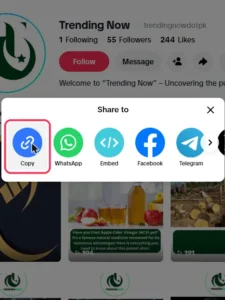
1. Copy the profile link.
Copy the creator’s profile address, in the form https://www.tiktok.com/@username. On a computer, it’s in your browser bar. If you only know the username, type it after https://www.tiktok.com/@.
2. Open TocWave.
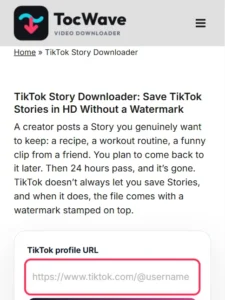
Go to the TocWave TikTok Story Downloader in any browser.
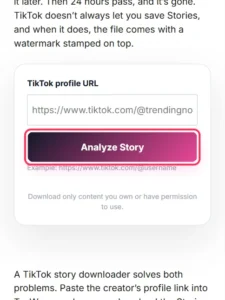
3. Paste the link.
Drop it into the input box and tap Analyze Story.
4. Pick your file.
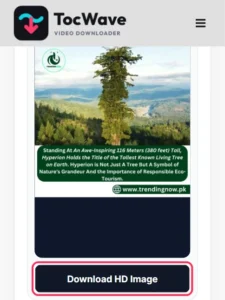
TocWave shows a preview of each Story the account has live, with a download button underneath.
5. Save it.
Tap the button, and the Story saves to your Downloads folder or camera roll.
The whole thing takes about as long as reading these five steps. If you only want to watch a Story rather than keep it, the TocWave TikTok Story Viewer is built for that.
Download TikTok Story by Username
TocWave works from the account, not from a single Story. This is handy when you want every Story an account currently has live, not just one.
Keep in mind that a username search only finds Stories that are still live. If the account hasn’t posted a Story in the last 24 hours, there’s nothing to show.
TikTok Story Download Without Watermark: How It Works
When you download a TikTok Story without watermark through TocWave, you’re not “removing” anything. The tool saves the public video file before TikTok’s app adds its branding to a downloaded copy. That’s why the result looks clean, with no blur or cropping where a logo used to be.
A quick reality check on what “no watermark” means:
So, a no-watermark download is the cleanest copy that’s publicly available. It isn’t an edited version.
Download Story TikTok HD: Quality and Format
Many people want to download Story TikTok HD files, especially for clips they plan to rewatch on a bigger screen. TocWave saves the Story at the best quality the creator made public. If they uploaded in 1080p, you get 1080p. If they uploaded something lower, that’s the ceiling.
No TikTok story downloader HD tool can add detail that was never there. Apps that claim to “upscale to 4K” are usually just stretching the video, and that makes it look worse, not better.
|
What you get |
Details |
|---|---|
|
Video format |
MP4, which plays on almost every phone, computer and TV |
|
Resolution |
Original public quality, up to what the creator uploaded |
|
Audio |
Included, just as it plays on TikTok |
|
Watermark |
None added |
Just want the sound? The TocWave TikTok to MP3 converter saves audio from regular TikTok video posts.
Save TikTok Stories on iPhone, Android and PC
Because TocWave works in any modern browser, you can save TikTok Stories on almost any device. The only difference is where the file ends up.
Why Download Stories from TikTok?
Stories are casual by design, which is exactly why they often hold things you won’t find anywhere else on a creator’s profile. Here are the most common reasons people download video Story TikTok clips:
Whatever the reason, a TikTok stories download takes seconds, while hunting for a vanished Story takes forever.
Is It Safe to Use a TikTok Story Downloader?
Yes, as long as the tool never asks for your TikTok password. TocWave doesn’t need an account, a sign-in or an app, so there’s nothing for it to collect from your TikTok profile.
Watch out for sites that push browser extensions, demand surveys before a download, or claim they can save private Stories. Those are red flags, not features.
TikTok Story Downloader Not Working? Common Fixes
Most failed downloads trace back to the Story, not the tool. Here’s what usually causes trouble:
|
Problem |
Likely cause |
Fix |
|---|---|---|
|
“Invalid link” |
You pasted a Story, video or sound link |
Paste the profile address, such as https://www.tiktok.com/@username |
|
“No Stories found” |
The Story expired or was deleted |
Stories only last 24 hours; check for a newer one |
|
“Private account” |
The creator limits Stories to followers |
Private Stories can’t be downloaded |
|
Download starts, then stops |
Weak connection |
Switch to Wi-Fi and try again |
|
File won’t appear in Photos (iPhone) |
It’s sitting in the Files app |
Open Files > Downloads and use Save Video |
Frequently Asked Questions
Final Thoughts
Stories are built to disappear, which is exactly why the good ones are worth saving. A TikTok story downloader gives you a clean, original-quality copy before the 24-hour clock runs out, with no watermark, no login and no app.
With TocWave, it’s a paste-and-tap job: drop in a profile link, download, done. Next time a Story makes you think “I need this later,” save it while you can. And please keep the creator in mind: share credit, not reuploads.