
TikTok Story Viewer: Watch TikTok Stories Online Without Logging In
You tap on someone’s Story, and a second later your name shows up in their viewer list. Most of the time, that’s fine. But sometimes you just want to see what a brand, a creator or an old classmate posted without turning it into a social moment. And if you don’t have a TikTok account at all, Stories are surprisingly hard to reach.
Story preview
Download only content you own or have permission to use.
That’s exactly the gap a TikTok story viewer fills. Paste a public profile link into the TocWave Story Viewer, and the Story plays right in your browser. There’s no app to install, no login screen, and no TikTok account attached to the view.
This guide walks you through how the tool works, what it can and can’t show, and what “anonymous” honestly means here. By the end, you’ll know when a story TikTok viewer is the right call, and when it isn’t.
What Is a TikTok Story Viewer?
A TikTok story viewer is a web tool that lets you watch public TikTok Stories outside the TikTok app. It fetches the Stories an account has posted in the last 24 hours and plays them in an ordinary browser tab.
To see why that’s useful, it helps to know how Stories work on TikTok:
They’re short-lived. A Story stays up for 24 hours, then moves to the creator’s private archive.
They’re easy to spot. An account with an active Story shows a coloured ring around its profile picture.
They’re tracked by name. While a Story is live, the creator can open a list of everyone who watched it.
That last point is what sends most people looking for a TT story viewer. When you watch from your own account, you show up on that list. When you watch through TocWave, you never sign in, so there’s no TikTok account for the list to show.
TocWave is an independent tool. It isn’t made by, or affiliated with, TikTok.
How to Use the TocWave TikTok Story Viewer Online
The TocWave TikTok story viewer online works in any modern browser, on phones and computers alike. If you’ve wondered how to watch TikTok Stories without the app, here’s the whole process:
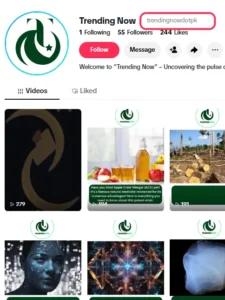
1. Find the account.
Copy the creator’s profile address, in the form https://www.tiktok.com/@username. If you only know the username, type it after https://www.tiktok.com/@.
2. Open the viewer.
Go to the TocWave TikTok Story Viewer in Chrome, Safari, Firefox, Edge or any other browser.
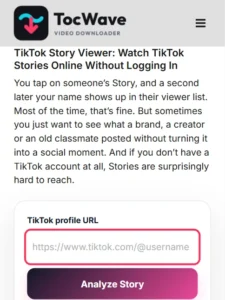
3. Paste and search.
Paste the profile link into the input box and tap Analyze Story.
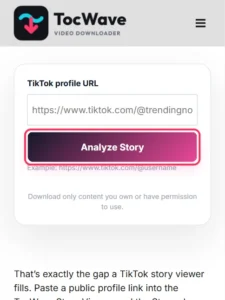
4. Pick a Story.
If the account has active Stories, they load as previews within a few seconds.
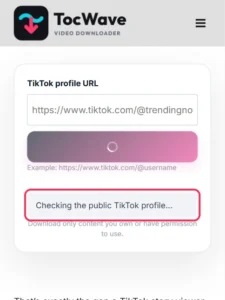
5. Watch.
Tap any thumbnail to play it. Scroll down to see the next one.

That’s it. No sign-up, no browser extension and no “verify you’re human” surveys.
View Every Live Story on an Account
The viewer works from the account, not from a single Story:
Want to keep a Story after watching it? The TocWave TikTok Story Downloader saves it to your device as a file. That’s a separate tool, because viewing and downloading are separate jobs.
Can You Watch TikTok Stories Anonymously?
Yes, in the sense most people care about. You can watch TikTok Stories anonymously with TocWave because the request never touches your TikTok account. The creator’s viewer list records TikTok accounts, and yours isn’t involved.
Still, “anonymous” is a word that gets oversold online, so here’s the honest version of what it does and doesn’t cover:
Be wary of any tool that promises you’ll be “100% invisible” or can unlock anything. That’s a sales line, not a technical fact.
TikTok App vs. an Anonymous TikTok Story Viewer
|
TikTok app |
TocWave Story Viewer |
|
|---|---|---|
|
TikTok account needed |
Yes |
No |
|
Your name in the viewer list |
Yes |
No |
|
App install needed |
Yes, on mobile |
No, browser only |
|
Like, reply or comment |
Yes |
No |
|
Private account Stories |
Only if you’re an approved follower |
No |
If you want to interact with a Story, use the app. If you just want to view TikTok Stories anonymously, the viewer is the cleaner option.
Which Stories Can a TikTok Story Viewer Show?
A TikTok story viewer can only show Stories that are public and still live. Here’s how that plays out in practice:
These limits aren’t a weakness of TocWave. They’re the creator’s privacy choices, and any honest TikTok stories viewer respects them. If a site claims it can “unlock” private Stories, it’s almost certainly a scam built to collect your data or your login.
Why People Use a Story TikTok Viewer
There are plenty of everyday, reasonable reasons to watch a Story outside the app:
Is It Safe to Use an Online Story Viewer?
It is, as long as you pick a tool that behaves like a normal website. TocWave works in any modern browser, needs no login and has nothing to install. Our server fetches the public Story for you.
Use these red flags to judge any TikTok story viewer anonymous tool you come across:
One more thing worth saying: viewing public Stories is normal, but use it respectfully. Watching a public Story is fine. Using a viewer to monitor or harass someone who has blocked you is not, and it may break TikTok’s rules or local law.
TikTok Story Viewer Not Working? Quick Fixes
Most problems come down to the Story itself, not the tool. Start here:
| Problem | Likely cause | What to do |
| “No Stories found” | The account has no live Story right now | Check again later; Stories only exist for 24 hours |
| “Use a profile URL such as…” | You pasted a username on its own, or a video or Story link | Paste the full profile address, such as https://www.tiktok.com/@username |
| Account is private | The creator limited Stories to followers | Nothing a viewer can do; follow the account in the app instead |
| Story won’t play | Slow connection or a browser extension blocking video | Refresh, switch networks or try a private browser window |
| Story vanished mid-watch | It hit 24 hours or the creator deleted it | It’s no longer available anywhere public |
Frequently Asked Questions
Final Thoughts
Sometimes you just want to watch a Story without logging in, installing anything or putting your name on someone’s viewer list. A TikTok story viewer handles exactly that, as long as you keep your expectations realistic. It shows public, live Stories. It doesn’t unlock private ones, and it doesn’t need your password.
The TocWave TikTok Story Viewer keeps the process simple: paste a profile link, tap once and watch in your browser. Bookmark it for the next time a Story catches your eye. And when you’d rather keep a video for good, the TocWave TikTok Downloader is one click away.